
Table of Contents
Navigate to:
Syncfic → Import
This section allows you to upload users into WordPress.
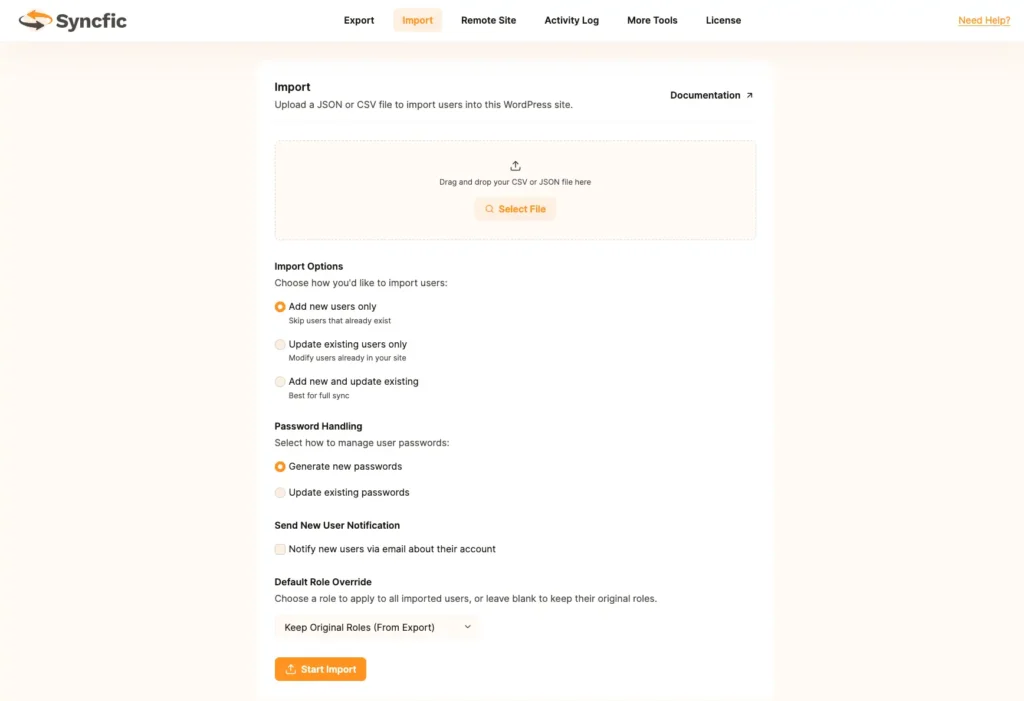
Step 1: Upload File #
- Drag & drop JSON or CSV file
OR - Click Select File
Step 2: Choose Import Method #
Option A: Add New Users Only #
- Skips users that already exist.
- Safe option for migration.
Option B: Update Existing Users Only #
- Only updates users already in your database.
- No new users created.
Option C: Add New and Update Existing #
- Full synchronization.
- Best for syncing two live sites.
Step 3: Password Handling #
Generate New Passwords #
- Creates new passwords for imported users.
Update Existing Passwords #
- Imports encrypted passwords from the file.
Step 4: Send User Notification (Optional) #
☐ Notify new users via email
If enabled:
- WordPress sends account email automatically.
Step 5: Default Role Override #
You can:
- Keep Original Roles (From Export)
OR - Assign a specific role to all imported users
Step 6: Start Import #
Click:
Start Import
Import begins and logs are recorded.


