
Table of Contents
Syncfic → Export
This section allows you to download users from your WordPress site.
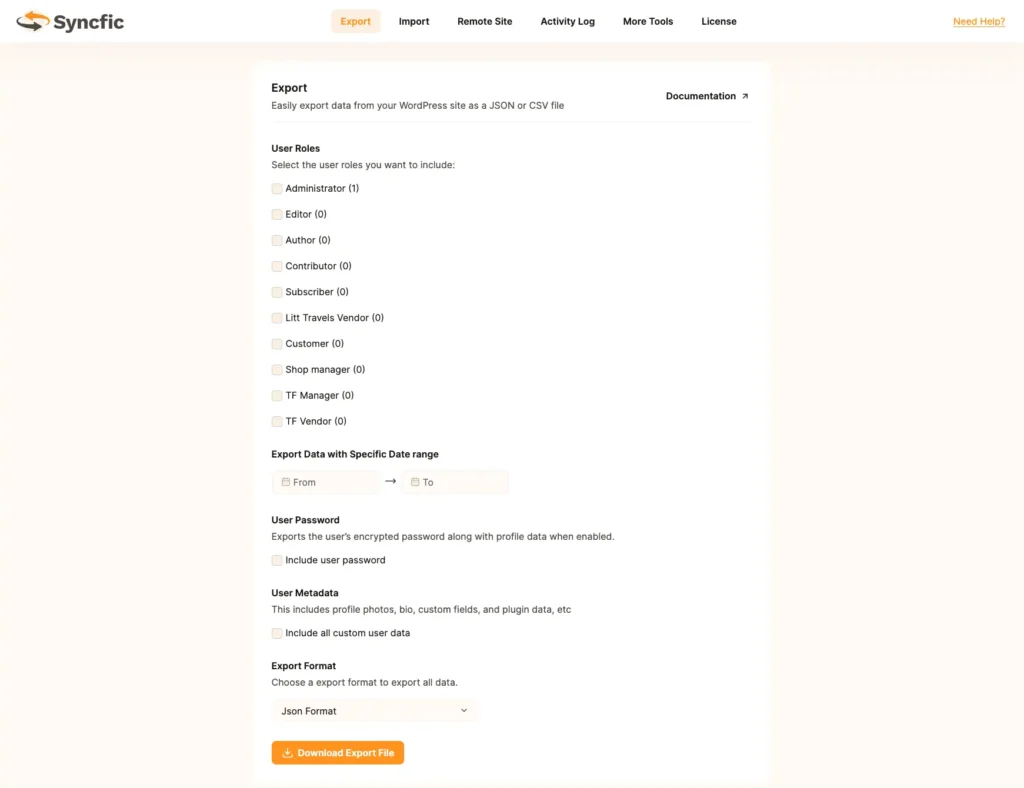
Step 1: Select User Roles #
Choose which user roles you want to export:
- Administrator
- Editor
- Author
- Contributor
- Subscriber
- Customer
- Shop Manager
- TF Vendor / TF Manager
- Any custom roles
You can select multiple roles.
Step 2: Export by Date Range (Optional) #
You can filter users by registration date:
- From Date
- To Date
Leave empty to export all users.
Step 3: Include Passwords (Optional) #
Option:
☐ Include user password
- Passwords are exported in encrypted format only.
- Never exported in plain text.
Step 4: Include User Metadata #
Option:
☐ Include all custom user data
Includes:
- User meta
- Custom fields
- Profile data
- Plugin-related data
Step 5: Choose Export Format #
Available formats:
- JSON (Recommended)
- CSV
Step 6: Download File #
Click:
Download Export File
The file will be generated and downloaded instantly.


